Convert Word to PDF for free
No sign-up, no watermark, no email address. Your file is deleted the moment the conversion finishes, and so is the PDF once it reaches you.
Drop a file here, or click to browse
- .csv
- .ods
- .odt
- .doc
- .docx
- .rtf
- .txt
- .html
What this converter does
It turns documents and spreadsheets into a PDF that looks the same on every machine. Upload a Word, OpenDocument, CSV, RTF, plain text or HTML file and you get a .pdf back, with the layout, fonts and images carried across.
A PDF is the right format when a document has to be read rather than edited: the page breaks stay where you put them, and nobody needs the software you wrote it in. To go the other way and get an editable file back, use the Word converter or the Excel converter.
How to convert a file to PDF
Drag your file onto the sheet above or click Choose a file. The conversion starts as soon as the file is chosen, and the PDF downloads on its own once it is ready.
Frequently asked questions
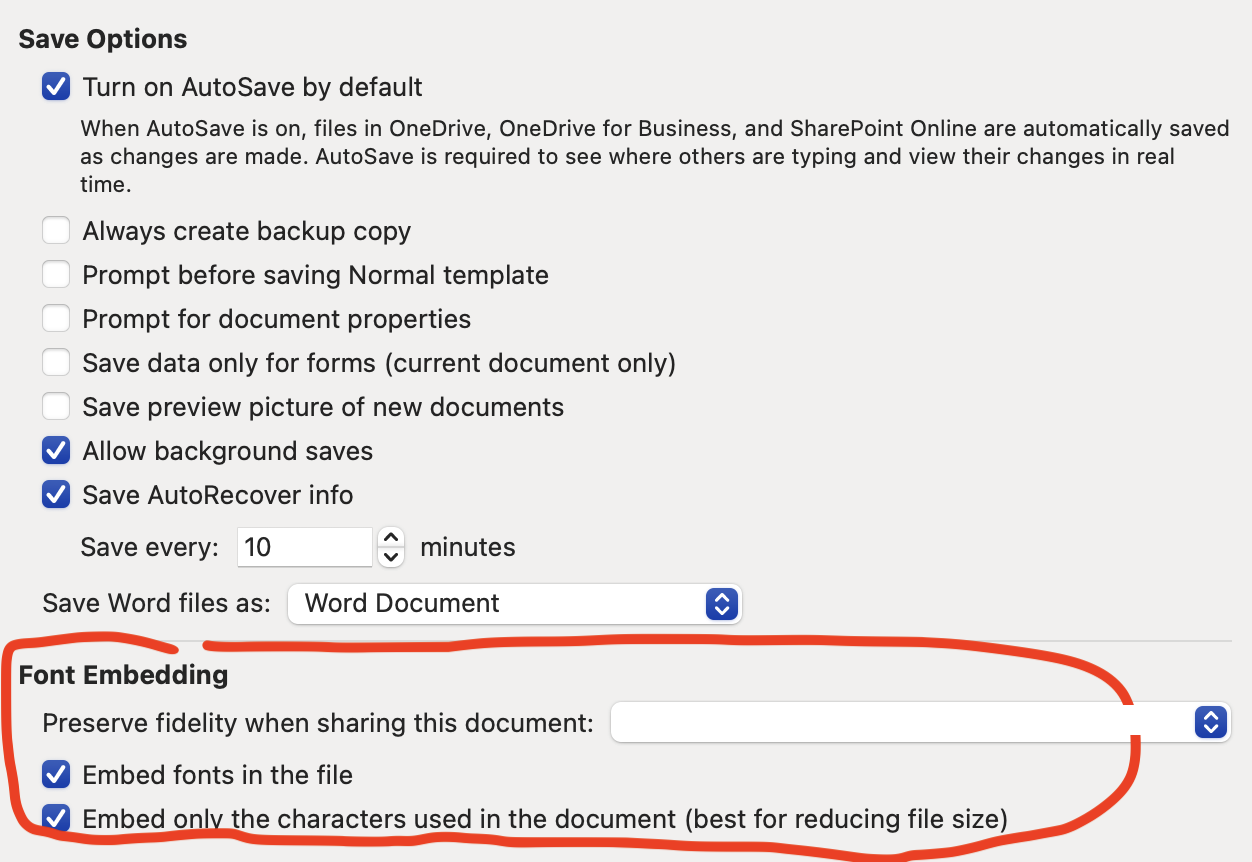
Fonts in word document not rendering correctly?
This is likely because the font you used in your Word document isn't available on our system. To fix this, embed the fonts in your Word document, as shown in the settings screenshot below.
Some objects or diagrams in word is missing from the converted PDF?
Open the document in word, copy the object and paste special, select SVG, PNG, or JPG.
Keep it free
No ads, no accounts, no analytics. Server time isn't free, so if this saved you a job, you can chip in.